
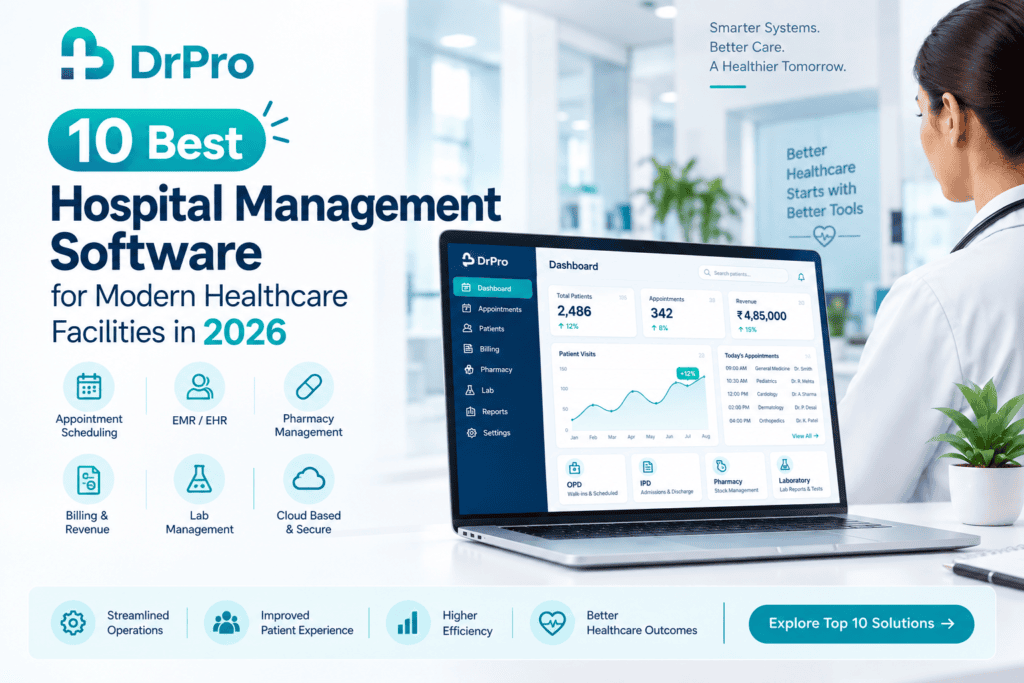
All-in-One Hospital Management Platform for a Smart Hospital. Running a modern hospital is not only about seeing patients. Hospitals need to handle registration, appointments, OPD, IPD, admin, discharge, medical records, prescriptions, billing, pharmacy, laboratory, inventory, reports, communication, and more every day.
Managing these manually with paper, Excel sheets, phone calls, and isolated apps results in team members wasting even more time and making more mistakes than necessary.
The hospital management software helps bridge the clinical, administrative, financial, and operational work in one place so the hospital team can be more productive and deliver quality patient care.
Choosing the right hospital management platform from the hundreds available today, however, can be tricky. In this guide, we compare 10 hospital management software platforms by their positioning, the features they offer, their target audience, and the types of hospitals that might benefit from their capabilities. Keep in mind that features, pricing, availability, and integrations can all change, so hospitals should check the latest specifications directly with each provider before choosing.
What Is Hospital Management Software?
Hospital management software is the online management of a hospital or a healthcare organization on clinical, administrative, financial, and operational levels.
Features of hospital management software consist of the following, depending on the platform:
- Patient registration
- APPOINTMENT SCHEDULING
- OPD management
- IPD management
- Admission and discharge
- Bed management
- DIGITAL PATIENT RECORDS
- EMR/EHR
- Digital prescriptions
- Billing and invoicing
- Pharmacy management
- Laboratory management
- Inventory management
- Reports and analytics
- Patient communication
- Multi-location management
What is the primary goal of connecting hospital workflows? To link daily hospital workflows in a way that physicians, nurses, hospital managers, reception staff, pharmacists, and lab operators can gain access to the relevant information from a single source.
1. DrPro
Why use DrPro?
DrPro is a comprehensive hospital information management system that provides integrated solutions to hospitals, clinics, labs, pharmacies, and other healthcare providers.
Its healthcare management solution handles appointments, patient management, EMR/EHR, OPD/IPD, billing, inventory, pharmacy, lab workflows, reports, and other healthcare workflows. All in a single platform.
Key features
- Appointment booking
- Patient registration and digital records
- EMR/EHR
- OPD management
- IPD management
- Digital prescriptions
- Billing and invoicing
- Pharmacy management
- Inventory management
- Laboratory management
- Reports and analytics
- Patient communication
- Multi-location support
- Cloud-based accessibility
- Mobile accessibility
Best for
Hospitals and healthcare facilities seeking a unified platform to oversee clinical, administrative, billing, pharmacy, lab, inventory, and operational workflows.
What makes it useful?
The goal is to manage all relevant workflows, such as appointments, patient charts, billing, pharmacy, laboratory, inventory, and reporting, from a single place rather than using different applications.
A typical workflow can move seamlessly from Appointment, Patient Registration, Consultation, EMR, Prescription, Lab, Pharmacy, and Billing Follow-Up, helping your team manage connected tasks in a single application.
2. athenaOne
Why use athenaOne?
AthenaOne is a healthcare platform that includes electronic health records, medical billing and practice management, and patient engagement.
AthenaOne is a software platform from athenahealth that integrates clinical and administrative operations for healthcare providers.
Key features
- Electronic health records
- Practice management
- Medical billing
- Patient engagement
- Scheduling
- Clinical documentation
- Revenue-cycle workflows
- AI-supported workflows
- Mobile accessibility
- Healthcare integrations
Best for
Health practices and organizations seeking a combined EHR, practice management, billing, and patient-engagement system.
What makes it useful?
Its integrated design links clinical notes to administrative and financial processes, enabling healthcare providers to handle several functions on one platform.
Explore athenaOne →
3. eHospital Systems
Why use eHospital?
Next Gen eHospital, a Hospital Management Information System built by the National Informatics Centre, is a hospital workflow-driven system.
Modules include registration of patients, outpatient (OP) and inpatient (IP), admission, discharge, and transfer (ADT), billing, and clinical workflows.
Key features
- Patient registration
- OPD management
- Appointment management
- Casualty registration
- IPD management
- Admission and discharge
- Billing
- Clinical records
- Investigation workflows
- Medicine workflows
Who is it for
Hospitals and health organizations that need an expanded hospital information management process.
What makes it useful?
Features and benefits that provide a structured hospital information system framework that integrates patient registration, clinical activity, billing, investigation, medicines, and hospital operations.
Explore eHospital →
4. MocDoc
Why use MocDoc?
About Moc Doc Moc Doc is a healthcare management platform for clinics, hospitals, medical centers, and other healthcare providers.
The platform offers workflows for managing patients, scheduling, clinical documentation, billing, reports, and services for patients.
Key features
- Appointment management
- Online booking
- Automated notifications
- Patient management
- Clinical records
- Prescription management
- Billing
- Reports
- Patient portal
- Token management
- Patient timeline
- Multi-location support
Who is it for?
For healthcare organizations that need digital workflows for patient, outpatient, billing, reporting, and operational processes.
What makes it useful?
With its emphasis on patients, clinical workflows, billing, reporting, communication, and appointment management, it can enable healthcare organizations to keep their day-to-day business organized digitally.
See Moc Doc→
5. Practo
Why use Practo?
Most popularly, Practo is known as a digital healthcare platform in India that offers technology solutions to doctors, clinics, and healthcare organizations.
Practo’s business ecosystem comprises appointment, patient, practice, and healthcare-related digital tools.
Key features
- Appointment management
- Patient records
- Digital prescriptions
- Billing
- Practice administration
- Patient communication
- Reports
- Digital healthcare services
Best for
Clinics, doctors, and other medical practices or organisations interested in digital healthcare and practice-management features.
What makes it useful?
Its integration with a larger healthcare technology ecosystem may be valuable for providers that already use or are considering using connected digital healthcare solutions.
Explore Practo →
6. Clinicea
Why use Clinicea?
Clinicea is a cloud-based healthcare management platform designed for doctors and healthcare practices.
The platform is designed to help create a unified system for daily healthcare management processes.
Key features
- Patient management
- Appointment scheduling
- EMR
- Billing
- Digital prescriptions
- Reports
- Patient communication
- Practice administration
Best for
Healthcare practices with a small or growing user base seeking a cloud-based digital management solution.
What makes it useful?
A cloud platform can enable healthcare teams to overcome their paper-based methods of information sharing and store essential patient data in one accessible place for authorized use.
Discover Clinicea →
7. HealthPlix
Why use HealthPlix?
HealthPlix works on a SaaS model based on the digital transformation of doctors and clinical workflows, as well as a dedicated focus on EMR and digitization of practices.
An EMR-focused platform can be used by doctors who want to digitize their clinical documentation from paper-based to structured digital records.
Key features
- Electronic medical records
- Digital prescriptions
- Patient history
- Clinical documentation
- Doctor-focused workflows
- Patient information management
Best for
Doctors and healthcare practices that focus on digital clinical documentation and EMR workflows.
What makes it useful?
Digital records can help make organizing and retrieving patient history easier than paper documentation.
Explore Health Plix →
8. Eka Care
Why use Eka Care?
Eka Care’s areas of focus include digital healthcare infrastructure, including digital health records and connected care experiences.
For healthcare organizations that care about digital records and connected health data, digital infrastructure could be a key dimension of healthcare modernization.
Key features
- Digital health records
- Patient information management
- Digital healthcare workflows
- Health information access
- Patient-focused digital services
Best for
Healthcare providers having an interest in digital health records and a connected healthcare experience.
What makes it useful?
Digital health infrastructure can be a step to transition healthcare data from paper-based, disjointed notes to streamlined, easily retrievable, and structured electronic health records.
Find out more about Eka Care →
9. DocPulse
Why use DocPulse?
DocPulse is a doctor practice-management tool that allows doctors and practices to take care of the day-to-day work through digital management.
For small and emerging practices, a healthcare practice management platform helps keep track of patient records andday-to-dayadministrative work.
Key features
- Appointment scheduling
- Patient management
- EMR
- Digital prescriptions
- Billing
- Reports
- Practice administration
Best for
Single health-care professionals, small practices, and practice and health-care providers in need of digital practice-management functionality.
What makes it useful?
A targeted health-care-management platform can streamline the routine clutter of administrative work and help remove reliance on handwritten records.
Explore DocPulse →
10. Hospital Management Information Systems
Why use a Hospital Management Information System?
Hospital Management Information Systems are built to integrate many departments and processes of a hospital into a digital integrated environment.
An HMIS can (depending on the implementation) handle patient registration, OPD, IPD, billing, laboratory, pharmacy, inventory, and hospital administration.
Key features
- Patient registration
- OPD management
- IPD management
- Admission and discharge
- Bed management
- Billing
- Pharmacy
- Laboratory
- Inventory
- Clinical records
- Reports
- Hospital administration
Best for
Companies looking to compile information management more generally across hospitals or healthcare sites.
What makes it useful?
The hospital-wide information system allows internal departments to integrate and reduce the time management spends on individual areas of operations. Find out more about Hospital Management Systems.
| Software | Best suited for | Key strength |
| DrPro | Hospitals, clinics & healthcare organizations | Integrated healthcare management |
| athenaOne | Healthcare organizations | EHR, practice management & billing |
| eHospital | Hospitals & healthcare organizations | Hospital information management |
| MocDoc | Healthcare organizations | Patient and outpatient workflows |
| Practo | Doctors & healthcare practices | Digital healthcare ecosystem |
| Clinicea | Medical practices | Cloud-based healthcare management |
| HealthPlix | Doctors & clinical practices | Digital clinical records |
| Eka Care | Digital healthcare users | Digital health records |
| DocPulse | Doctors & smaller practices | Practice management |
| HMIS | Hospitals & healthcare organizations | Hospital-wide information management |
Note: This comparison is just an overview, not a ranking. The best hospital software varies based on your hospital size, departments, workflow, budget, integrations, scalability, and what features are needed for your hospital.
What Features Should You Look for in Hospital Management Software?
Don’t judge hospital software by the number of features. Ask instead: do those features meet your hospital’s daily needs?
1. Patient Registration
Registration: The system should allow for simple patient registration, profile keeping, and information retrieval.
2. IPD & OPD Management
The system should allow the hospital to manage outpatient as well as inpatient services through sequential workflows digitally.
3. Admission & Discharge Set Procedures
The solution should allow hospital admission, transfers, discharge, and their documentation.
4. Bed Management
The hospital should have visibility of beds available, occupied, allocated, reserved, and assigned.
5. EMR/EHR
Electronic medical records help doctors and authorised members of staff document structured clinical data, patient history, files, prescriptions, findings, and reports.
6. Billing & Payments
Billing, invoicing, financial collection, payment monitoring, discounts, and financial reporting features should be present.
7. Pharmacy & Inventory
Pharmacy & inventory tools can assist hospital administration in tracking medicines, goods, inventory movement, stock, purchases, and storage.
8. Laboratory connected
flow can be key in managing samples, orders, digital reports, results, and samples.
9. Reporting & Insights
Reports can assist hospital administration in understanding customer activity, admissions, collections, billing, pharmacy, laboratory, and operational efficiency.
10. Security & User Access
Since health industry information is private, hospitals ought to consider authentication, role-based access, backup, and other information security practices.
How to Choose the Best Hospital Management Software
Is there anything unique about my hospital?
There is no single software product that works well for every hospital.
Does it match your hospital workflow?
The needs of a multi-disciplinary hospital, small hospital, diagnostic center, or big hospital might be different.
Does it connect my departments?
Check whether the product connects the departments and workflows you actually use.
Does it support future expansion?
Think about how many more doctors, hospital departments, users, locations, and patients are likely to be added.
Is it easy for staff to use?
Even if a product is powerful enough for you, it will not be helpful if the doctors, nurses, receptionists, pharmacists, laboratory staff, and other end users find it difficult to use.
Is support available?
Implementation, training, data migration, troubleshooting,g and product support may be just as important as the features.
Why DrPro Is a Strong Choice for Modern Hospitals
Beyond DrPro is the most simple and complex health care management system for hospitals, more than just patient registration or an appointment.
Patient registration, appointments, EMR/EHR, OPD/IPD, Billing, Inventory, Pharmacy, Laboratory Management, Reports, Mobile, and more are all integrated into DrPro, the end-to-end healthcare system.
A connected hospital workflow can move from:
Appointment → Patient Registration → OPD → Consultation → EMR → Prescription → Laboratory → Pharmacy → Billing → Follow-Up
For admitted patients, the workflow can extend to:
Admission → Bed Allocation → IPD → Clinical Care → Laboratory/Pharmacy → Billing → Discharge → Follow-Up
Connecting the dots: Creating an integrated system that links data between hospital processes, rather than handling each step as a siloed administrative task. The promise is straightforward: Less paper.
Streamlined flow.
More time with patients.
If your hospital is prepared to move away from many unsupported, unlinked tools and toward a single digital healthcare system, try DrPro and request a software demo.
Explore DrPro Hospital Management Software →
The Future of Hospital Management Software
Healthcare is evolving into a more connected digital way of working. Patient registration is going digital. Medical data is being transitioned from paper to digital forms.
Billing is becoming more automated, and reporting is on the rise.
Healthcare organizations are uniting clinical, administrative, pharmacy, laboratory, and other workflows.
The future of hospital management software will also likely be transformed by artificial intelligence (AI) and automation. The best hospital management software will solve practical operational challenges such as:
- Reducing repetitive administrative work
- Organizing patient information
- Improving OPD and IPD workflows
- Simplifying admission and discharge
- Connecting hospital departments
- Simplifying billing
- Improving pharmacy and inventory visibility
- Connecting laboratory workflows
- Providing useful reports
- Supporting better patient communication
Our goal is to free teams from repetitive admin work so they can concentrate on patients.
Conclusion
Choosing the right hospital management software can revolutionise the way your organisation works.
No paper patient records, no Excel spreadsheets, no unconnected billing software, no manual appointment scheduling, no information silos between departments, just the right platform that suits your hospital’s ways of working and makes things easy for staff to use, safeguard the hospital’s information, and evolve along with your organisation.
If you’re looking for a platform that integrates with your hospital workflows and includes everything from patient management to OPD, IPD, EHR, billing, pharmacy, lab, inventory, reports, and more, you may want to take a look at DrPro.